
Your new employee is already here. Meet Efi.
A smart digital employee that knows your business, remembers what matters, carries out tasks and helps you run the business, right on WhatsApp.
The first month is free, no credit card. Then from 69 NIS + VAT a month.
- No app to install
- No system to learn
- No stopping work
Works with the tools you already have
- Google: Calendar and Gmail
- Outlook and Microsoft Calendar
- iCount
- Green Invoice
- asMade Now
- Zapier, Make and lead ads
Until now you chose between convenient and orderly. Not any more.
A WhatsApp group is convenient but everything gets lost in it. A spreadsheet is tidy but nobody updates it. A chatbot answers but does not work. Efi takes the convenience of WhatsApp, the order of a system and the initiative of an employee.
| A WhatsApp group | A spreadsheet | A regular chatbot | Efi | |
|---|---|---|---|---|
| Who owns it? | The request drowns among dozens of messages | Someone has to open it and fill it in | Does not know who works for you | Every task has an owner and a date, from one message |
| Who follows up? | Nobody, until someone remembers | You, yourselves | Waits until you ask | Reminds and follows up until the task is closed |
| What actually happened? | You scroll to find out | Whatever someone remembered to update | Forgets the conversation once it ends | Every change is recorded: who, what and when. And a business memory that stays |
| Customers and leads | Scattered over private chats | A separate file that goes stale | Has no access to them | A lead arrives from the website or a message, and whoever handles it is told at once |
| Control | Anyone can write anything | Everyone sees everything, or nobody | No confirmation and no action log | Permissions by role, a sensitive action waits for a yes, and every action is logged |
| Setting up | Instant, but without order | Hours of building and training | A separate window you open when you remember | Minutes, with no app and no training |
The request drowns among dozens of messages
Every task has an owner and a date, from one message
Nobody, until someone remembers
Reminds and follows up until the task is closed
You scroll to find out
Every change is recorded: who, what and when. And a business memory that stays
Scattered over private chats
A lead arrives from the website or a message, and whoever handles it is told at once
Anyone can write anything
Permissions by role, a sensitive action waits for a yes, and every action is logged
Instant, but without order
Minutes, with no app and no training
Someone has to open it and fill it in
Every task has an owner and a date, from one message
You, yourselves
Reminds and follows up until the task is closed
Whatever someone remembered to update
Every change is recorded: who, what and when. And a business memory that stays
A separate file that goes stale
A lead arrives from the website or a message, and whoever handles it is told at once
Everyone sees everything, or nobody
Permissions by role, a sensitive action waits for a yes, and every action is logged
Hours of building and training
Minutes, with no app and no training
Does not know who works for you
Every task has an owner and a date, from one message
Waits until you ask
Reminds and follows up until the task is closed
Forgets the conversation once it ends
Every change is recorded: who, what and when. And a business memory that stays
Has no access to them
A lead arrives from the website or a message, and whoever handles it is told at once
No confirmation and no action log
Permissions by role, a sensitive action waits for a yes, and every action is logged
A separate window you open when you remember
Minutes, with no app and no training
Everything a digital employee needs to know, in one chat
Pick an area and see what it looks like in a conversation: tasks, reminders, shifts, memory, leads, calendar and mail, and control.
You ask in chat, Efi opens and follows
- Tasks for the teamOne task for several owners or a whole team, with follow-up on each of them.
- A personal task for an employeeEvery employee opens and manages their own tasks, in a chat or in the panel.
- Acknowledge and closeConfirm receipt and close with a word, a photo or a file.
- Due-date changes by approvalA postponement request goes to whoever assigned the task, and the date changes only with their approval.
- Recurring tasks and checklistsTasks that repeat daily, weekly or monthly, and a list of items inside a task.
- Manager review before closingThe manager asks to look before a task counts as done: the employee finishes, and the manager approves or sends it back with a reason.
Efi comes back until the work is done
- Reminders for employeesThe day before, on the due date and at the chosen time, right on WhatsApp.
- Follow-up until doneEfi comes back and asks until the task is closed, as you set it.
- Quiet hoursNo messages at night and on weekends, by the business settings.
- Evening report and morning planIn the evening: what was done, what is open and who did not answer. In the morning: planning the day.
- Status summary on requestWho is doing what, what is late and what is at risk, in one question.
- Escalation to the managerAn item that was not handled goes up to the manager, with nobody chasing.
A work schedule, from the chat
- Work scheduleA weekly schedule for employees and branches, with conflicts and gaps flagged.
- Availability, from the chatEmployees write to Efi which days and hours work, or submit in the panel. Efi reminds on WhatsApp whoever has not, on the day and hour you set.
- Shift swapsThe employee writes: I want to swap the Tuesday shift with Yossi. The manager approves in the chat (after a yes) or in the panel, and both employees are told.
- Every assignment under the managerThe system proposes an assignment from the availability, and the manager approves and publishes. Every employee gets their shifts on WhatsApp.
- My shiftsWhich shifts do I have? and Efi answers, only from what was published.
What was agreed? Efi knows
- Business memoryAgreements, commitments and preferences, with source and verification status.
- Searching the groupsAsk in plain language, and Efi searches the text messages of the groups the owner switched search on for.
- A summary on requestEfi reads the latest messages in the group and summarizes what was said.
- Voice note transcriptionA voice note you send to Efi becomes text and is kept in memory.
- Text from imagesReads text from a picture you send to Efi and keeps it as part of the information.
- ContactsCustomers and suppliers: save in one message and look up in one question.
Leads that do not fall between the chairs
- A new lead in one messageName, phone, what they want and when to call back. Efi records it and reminds you.
- A lead from your website or FacebookA secret address for each source (a website form, Zapier, Make, lead ads). Whoever handles it gets a WhatsApp message within seconds.
- When to call a customer backOn the date you set, Efi writes who to call back, with the phone number.
- The same person again? No duplicate leadA repeat inquiry is added as a note on the open lead.
- The sales pictureHow many leads are open, who is waiting for a quote and what closed this month. Just ask Efi: How are sales?
Your calendar and mail, from the chat
- Google or Outlook, everyone their ownConnect with one link. Nobody else sees your calendar, not even a manager.
- A reminder before a meetingEfi writes to you 15 minutes before (or whenever you ask), with the place and a link.
- What goes out waits for your approvalAn invitation, a change, a cancellation and sending mail go only after a yes, and you see the full text.
- MailSend mail from your own account in one message, and with Outlook you can also ask: Do I have new mail?
- Quotes and invoicesIssued in your own iCount or Green Invoice account, after approval.
Efi suggests, you approve
- Connecting your own toolsGoogle or Outlook, iCount or Green Invoice. Every action there waits for your approval.
- Onboarding and acknowledgementsForms and procedures the employee confirms, with a reminder until confirmed. Who confirmed and when is kept (not a binding electronic signature).
- Approval for sensitive actionsIssuing an invoice, sending mail and a calendar invitation wait for an explicit approval.
- Action logWho asked for what, what was done and what was refused.
- Teams and permissions per teamDivide the people into teams and set what each team sees and changes in every screen. If the owner switches it on, a manager sees only their own teams.
- Someone leaves? The work moves onOpen tasks and leads move to another person in one click, and finished work and the history stay in the business.
- API and webhooks for free integrationsAn API key to create and read tasks, contacts and leads, and a signed webhook that tells your system when something happens. Fits Zapier, Make, your website and your CRM.
- Export and deletionYou can export or delete the business data, and pause information sources.
Add Efi to a group. It listens, remembers, and you can search.
What is written in a work group is kept, and later you ask in plain language and get an answer based on the messages themselves.
- You add Efi to a group like any member. The owner links it to the business with a one-time code, and a group that was not linked is not handled.
- Efi listens and remembers: the text messages written in the group are kept, and you can search them at any time.
- You ask What did we agree with the supplier? or What was written about the order? and Efi searches the messages and answers from what was written.
- The answer is based on the messages themselves, with who wrote them and when.
- You stay in control: the owner chooses which groups are open to search and for how many days messages are kept, and you can pause or delete.
- For each group you choose what Efi does in it: answers only when addressed, suggests tasks that came up in the conversation, or acts in it. The entry package lets Efi be in one group, and you can extend it to 3 or 10 groups. A group beyond the allowance is paused, and nothing is deleted.
- If the owner switches it on, Efi suggests to the manager each evening tasks that came up in the group and were not assigned. Nothing opens without approval.
The small details that save hours
You do not have to learn any of them. You write, record or photograph, and Efi understands.
A voice note instead of typing
You record, Efi transcribes and opens the task.
A photo Efi reads
Photograph a document or a sign and Efi pulls out the text and saves it.
What was agreed in the group?
You ask, and Efi searches the messages and answers from what was written.
Points and a weekly goal
Every closed task adds points, with no spreadsheets and no chasing.
A task that closes only with proof
The employee photographs it, Efi attaches the picture to the task, and it closes.
Attendance through asMade Now
Clock-ins and clock-outs are recorded, and Efi knows who is on shift.
A notice board, kudos and requests
A notice for everyone, a good word for an employee and a request that reaches the manager.
A read confirmation for an announcement
Everyone confirms read, and Efi reminds and tells the manager who has not.
A recurring question to the team
How was the day? every evening, and the manager gets one summary.
Everyone in their own language
Russian, Arabic, Amharic and more: Efi writes to each employee in their language.
Tasks that fell between the chairs
Efi suggests to the manager in the evening what came up in the group and was not assigned. If the owner switched it on.
One word: help
Efi answers with what you can ask for, by your role and the modules that are on, with a link to the full help page.
Quiet hours, Shabbat and holidays
Efi does not write on its own at night, on Shabbat or on holidays. That is the default, and you can change it.
Search by meaning
You ask in your own words, and Efi also finds what was written in other words, with the source.
Alerts to the manager
Stuck tasks, tasks with no owner and a person who is overloaded: when you switch it on, Efi tells the manager once a day or a week, and stays quiet when there is nothing to report.
Links on the customer card
A Drive folder, a quote or a site: a button on the customer card, one click away.
The team phone book
What is Yossi’s number? and Efi answers, within the permissions.
And when you want to see it all, there is a panel
WhatsApp is the daily interface. The web panel is where the owner sees the full picture, manages permissions and sets Efi up. The screenshots are of the real system, with example data.
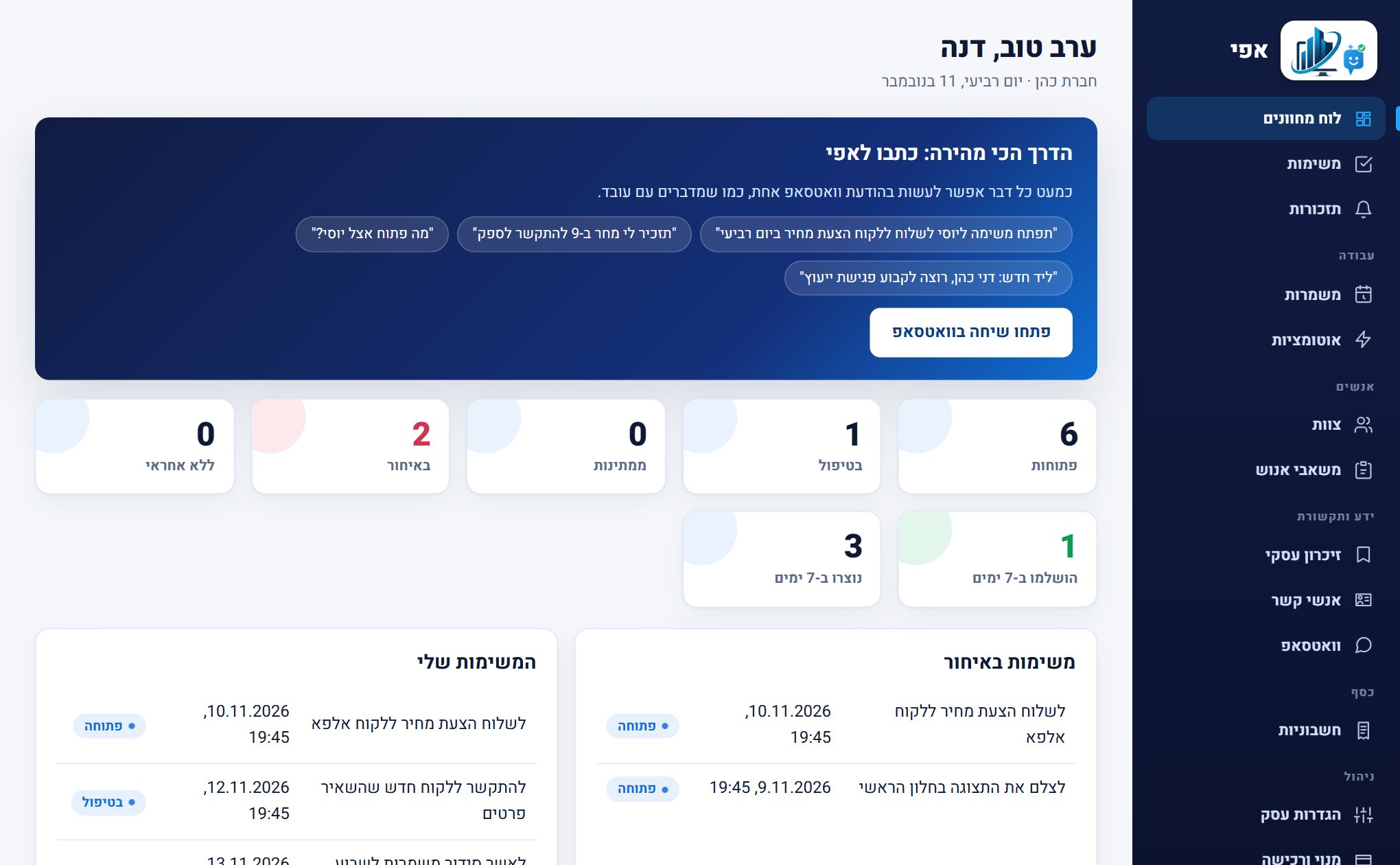
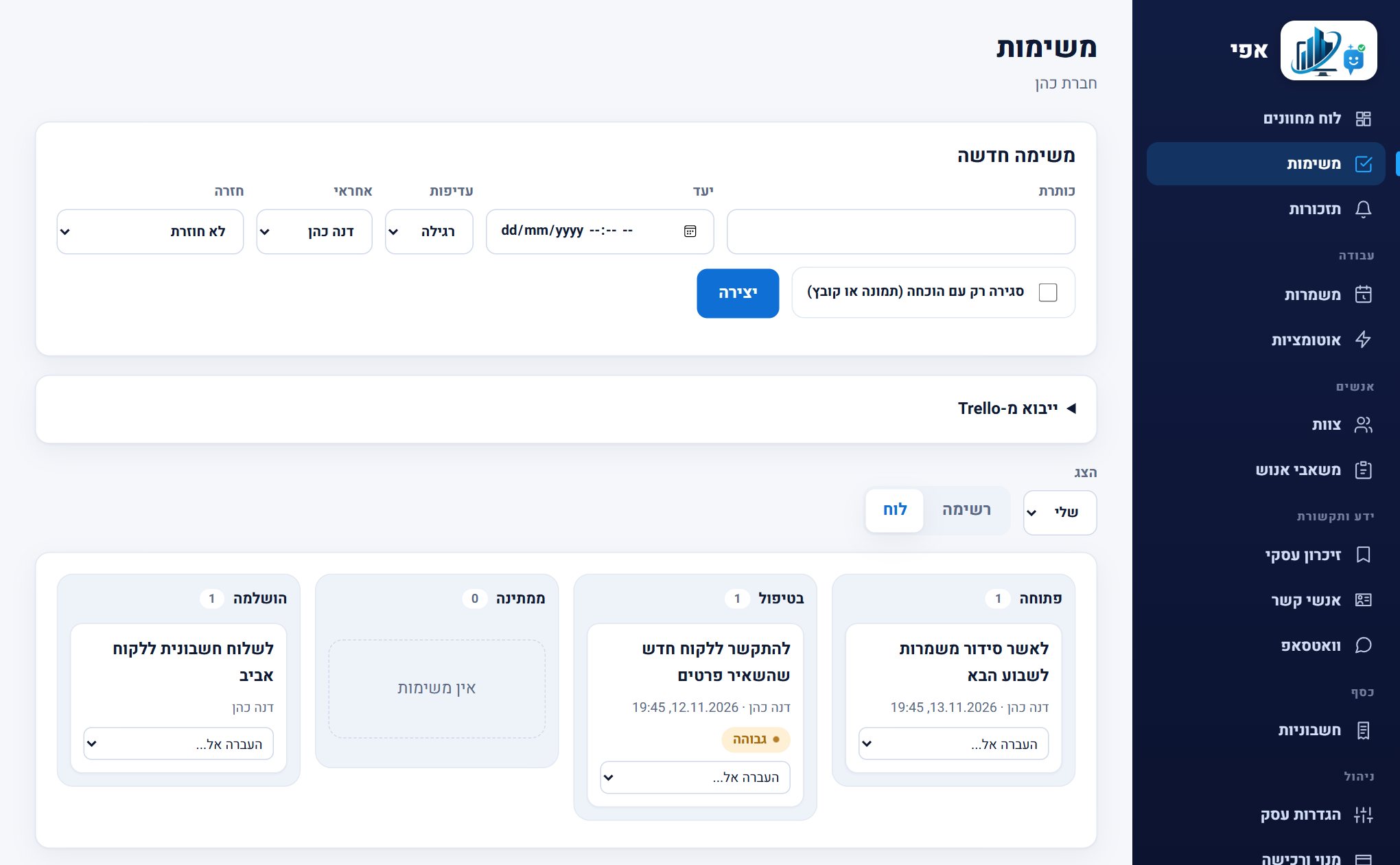
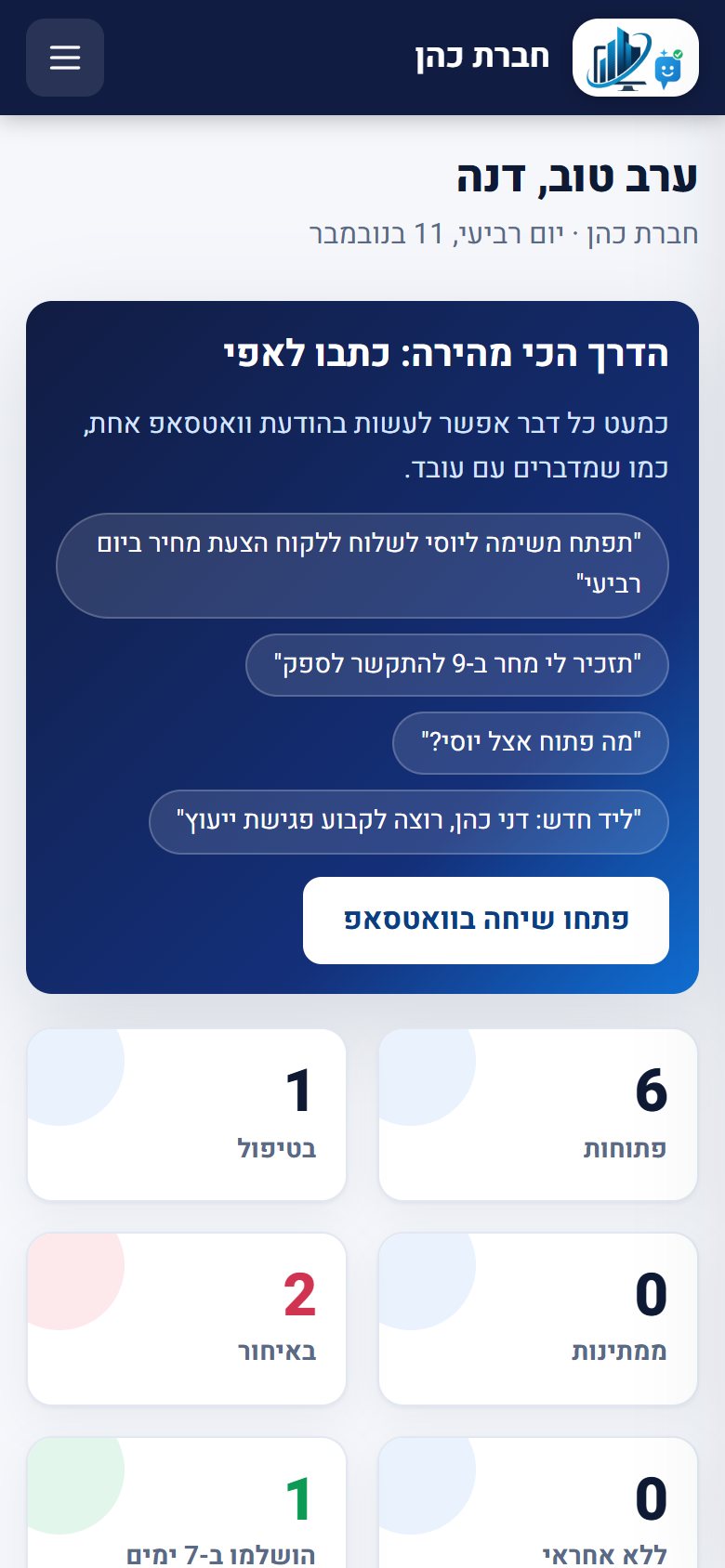
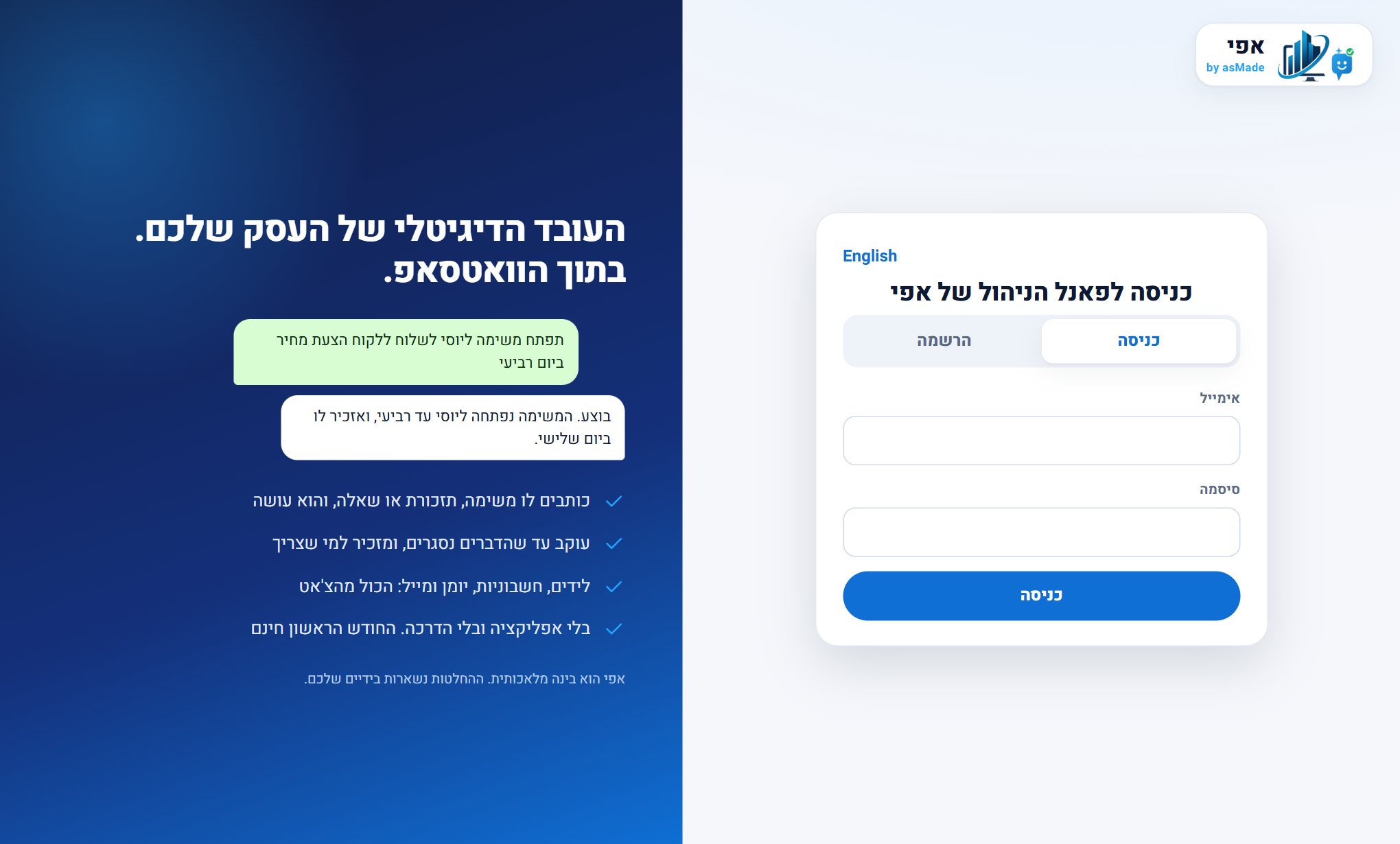
Everyone sees and does only what fits them
Efi acts by the role of the person talking to it, so the whole team can use it with confidence.
The owner
Sees the full picture and approves with a yes whatever goes out: an invoice, an invitation, a mail.
What is open? Who is late? How are sales?
A branch or team manager
Opens tasks for the team, checks finished work, builds the shift schedule, approves swaps and picks up a lead that arrives from the website.
Open a task for the whole team by Thursday
An employee
Gets a task on WhatsApp, confirms, photographs the proof and closes it. No app and no password.
Got it, starting today
You can also set a manager to see only their own teams. There is also a viewer role, which sees what is going on without changing anything. And whoever does not want proactive messages from Efi writes stop.
Efi is an AI. The decisions stay yours.
To work with a digital employee it has to be clear what it does and what it does not.
It is not a person
Efi is a digital employee based on artificial intelligence. It can be wrong, so it asks when a detail is missing instead of guessing.
A sensitive action waits for you
Issuing an invoice, sending mail or a calendar invitation is not carried out until you confirm, and only within a short time.
Every action is recorded
An action log shows who asked, what was done and what was refused.
Your information stays yours
Every business is separate from the others, and access is by role. You can request an export and deletion of the business's data.
Efi is independent from asMade Online
A separate product with its own accounts and data, not part of the other asMade systems.
Responsibility stays with you
Efi assists and organizes. The business decision and the responsibility for the content stay with whoever runs the business.
Three steps and your digital employee starts getting to know the business.
Join Efi
You open an account and set up the business.
Connect your team
You add employees easily, you can talk to Efi in a personal chat, and you can add Efi to the team's work groups, simply and quickly.
Start working
You talk to Efi, share information, assign tasks and let it get to know the business.
Every business needs someone who makes sure things happen.
Efi is not built for one industry. It suits businesses of every kind: restaurants and hospitality, retail, services, health and care, education, logistics, management and operations, and more.
Start with a free month
in the entry package, per business, after the first month
- The first month is free, with no credit card
- You pay only for what you switch on: modules as you need them, with 5% off from 3 modules and 10% off when you switch them all on
- Extend whenever you want: more WhatsApp groups and more stored messages. What you pick at sign-up is free in the first month
- No app, no training and no commitment
- No per-message WhatsApp fees: Efi works on its own number
Frequently asked questions about Efi
What is Efi?
What is the difference between Danny and Efi?
Is Efi a chatbot?
How does Efi get to know the business?
Do I need to install an app?
Can I work with Efi through WhatsApp?
Can I add several employees?
Can Efi work in WhatsApp groups?
Can I limit what employees may do?
Does Efi suit every kind of business?
Is my business's information kept apart from other businesses?
Does Efi act on its own?
Can I follow what Efi does?
How much does it cost?
Can I connect Efi to my own systems?
What happens when an employee leaves?
How do I get leads from my website or Facebook into Efi?
Does Efi suit employees who do not speak Hebrew?
How do I know everyone read an important message, and how do I ask the team a question every day?
What if WhatsApp blocks the number Efi works on?
Give your business a digital employee.
Efi is ready to help you get to know the business, move tasks along and stay in control of the daily activity.